Get one field from a whole list of accounts, without code
Paste a list of usernames, links or IDs, tick the field you need, such as the bio, and copy the results as text or download a CSV. It works for 44 endpoints on 9 platforms, in your browser.
The short answer
To export the bio of 1,000 Instagram accounts: open the Playground, choose Instagram Profile, switch to Multi, paste the usernames, choose the Biography field and click Run. Then click Copy.
- Size. One run takes up to 500 lines, so 1,000 accounts are 2 runs. Requests run 3 at a time on a new account and 10 at a time after a purchase.
- Cost. Each line is one request. An Instagram profile costs 1 credit, so 1,000 bios use 1,000 credits. A new account starts with 100 free credits. The Builder pack is 25,000 credits for $19.99, so 1,000 profiles cost about $0.80.
- Output. One result per line in the order of your list, as plain text, CSV or JSON. Choosing fields does not change the price.
- Scope. Publicly visible data only. You never connect or log in to a social account.
Updated . Limits and prices on this page come from the live catalog.
Step by step
The example exports Instagram bios. Every other platform and field works the same way.
Create a free account
Sign up and you get 100 free credits. No card is needed. One credit is one request to most endpoints.
Open the Playground and pick what to fetch
Choose the platform and the endpoint. For bios, pick Instagram and then Profile.
Switch to Multi and paste your list
Click Multi (paste a list) and paste your usernames, links or IDs, one per line. A run takes up to 500 lines and duplicates are removed.
Choose the field you need
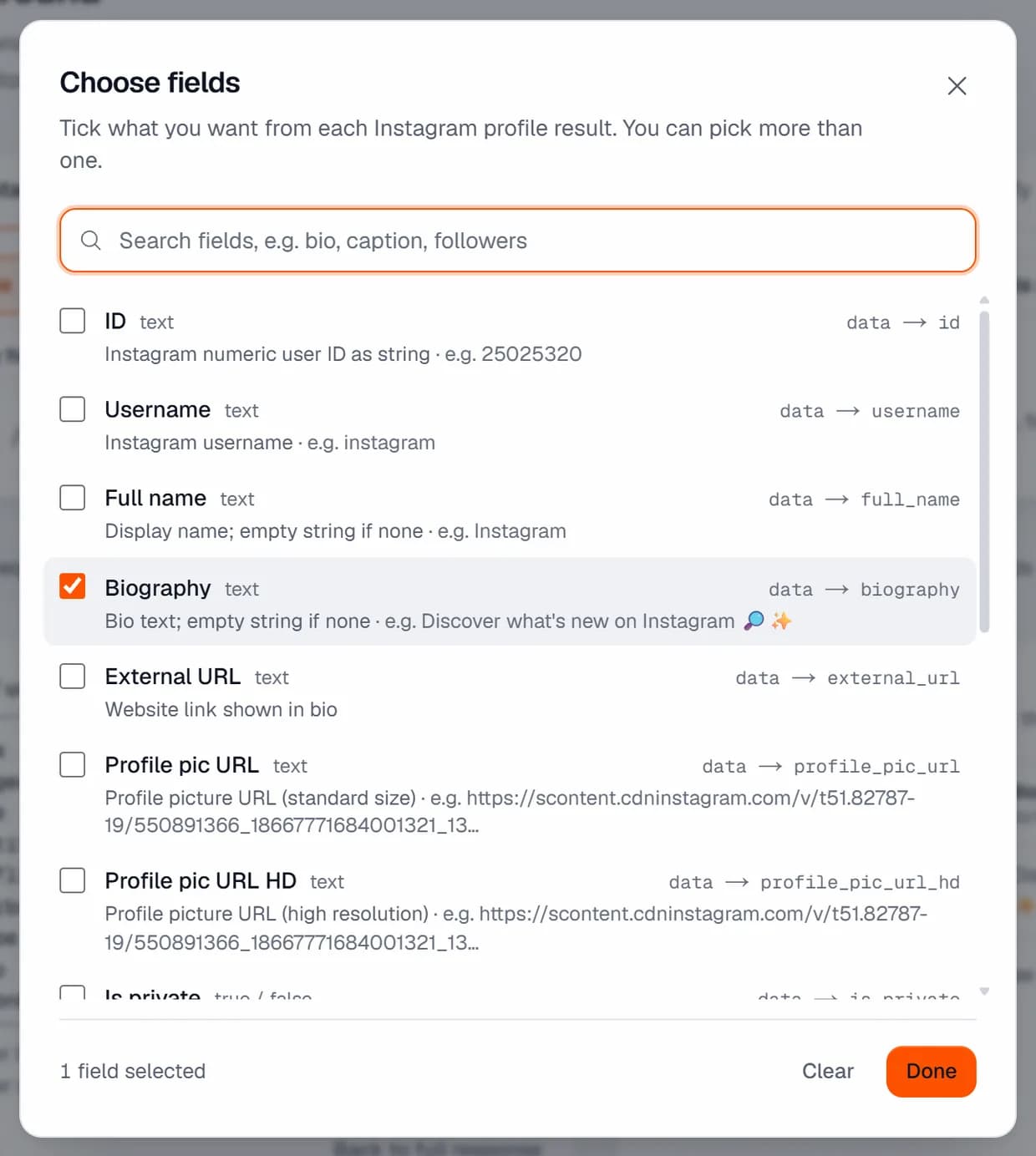
Under Fields, click Choose fields and tick Biography. You can tick up to 25 fields. Leave it on Full response if you want everything.
Run it
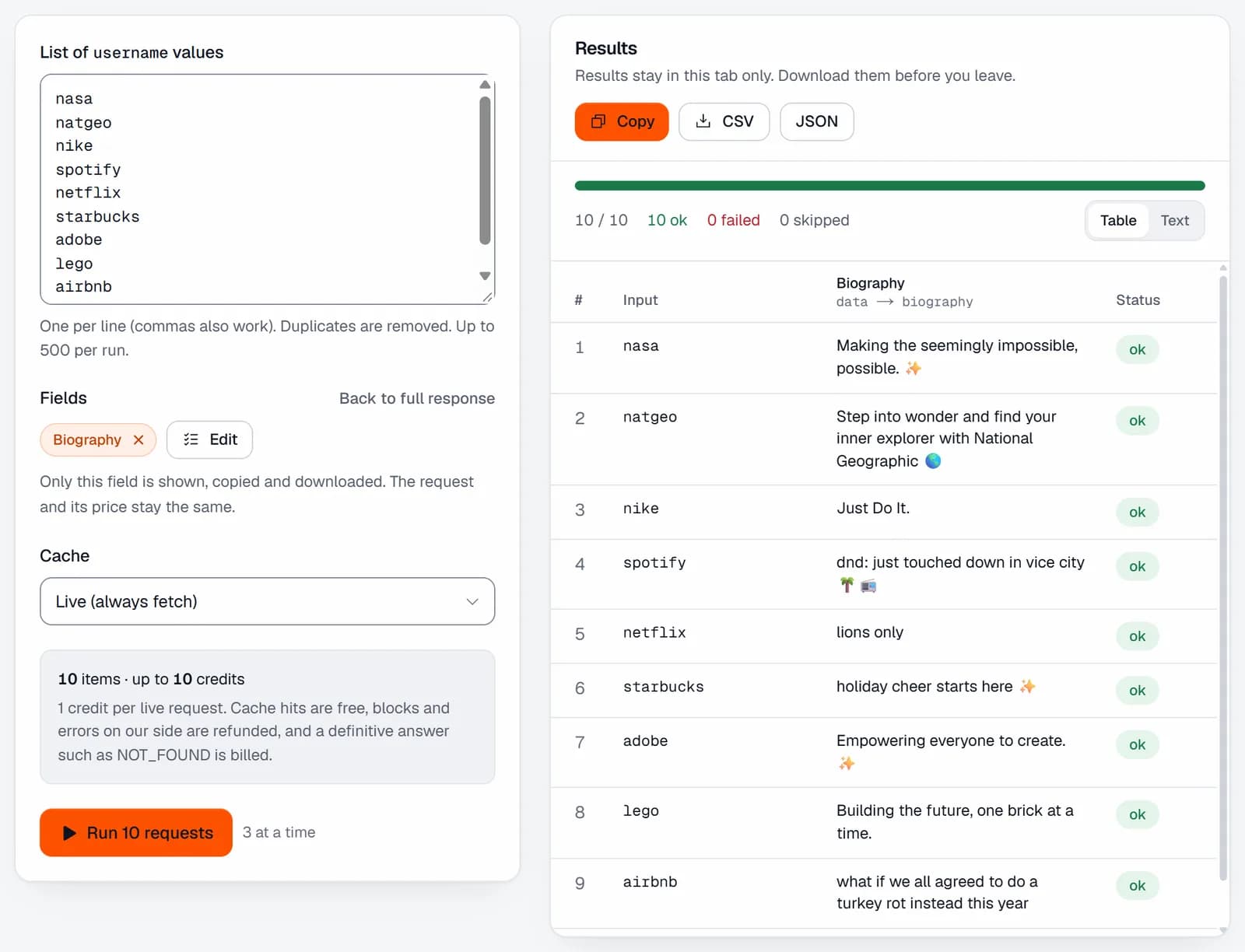
Click Run. Every line is fetched as its own request and its result appears as soon as it finishes.
Copy the results or download them
Click Copy to get one result per line, in the order of your list. The Text view shows the same lines in a box you can select, and CSV and JSON downloads are next to it.
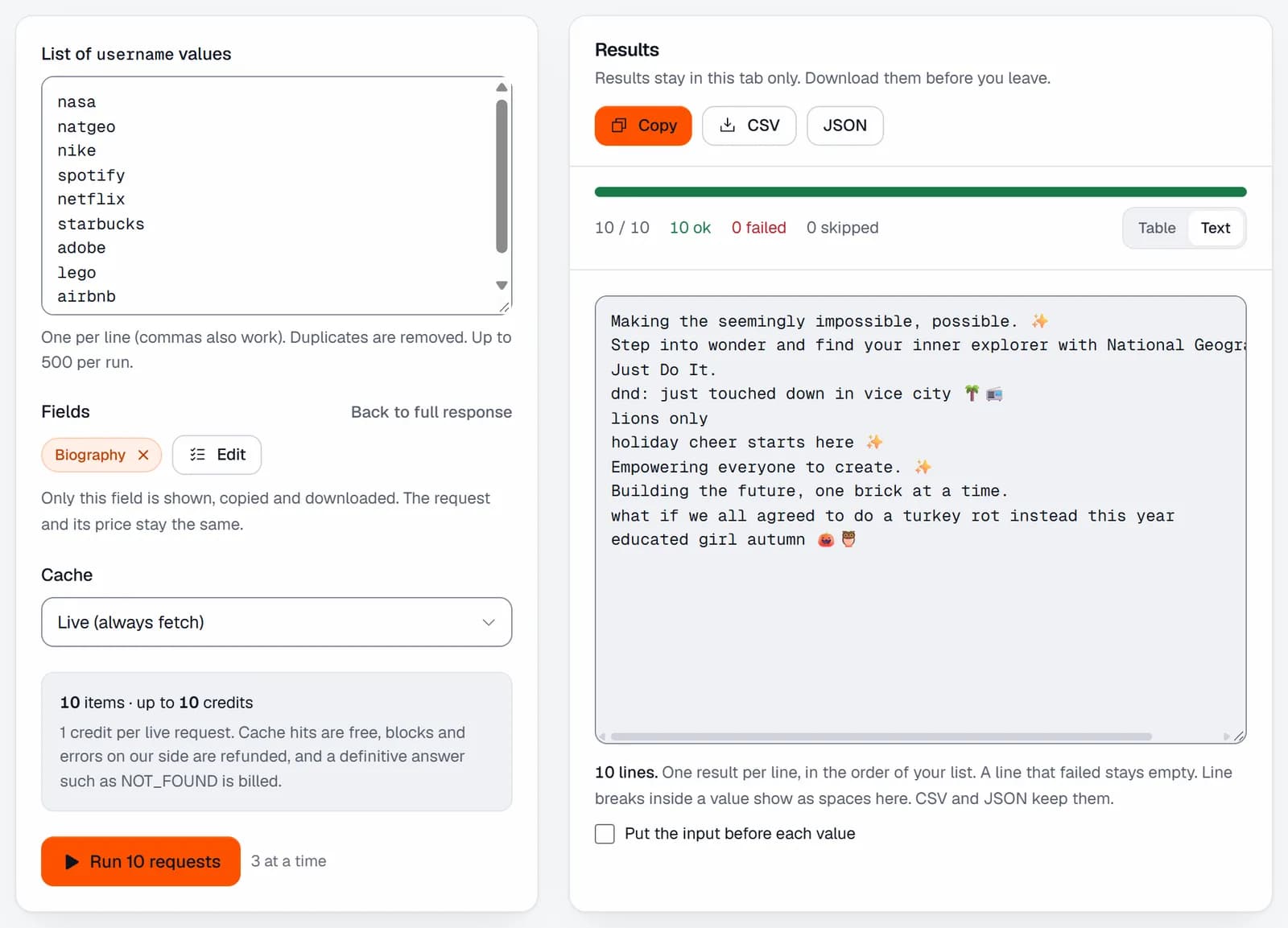
The screenshots show real results for ten public brand accounts. Results stay in your browser tab: nothing is stored on our servers beyond your normal usage log, so copy or download them before you leave the page.
What people export
Pick the endpoint, paste the list, tick the fields. A field inside a list, such as the caption of each post, gives one line per item.
- The bio of every Instagram account in a list
- Endpoint
- Instagram profile
- Paste a list of
- usernames
- Fields to tick
- Biography
- Credits per line
- 1
- Follower counts for a list of Instagram accounts
- Endpoint
- Instagram profile
- Paste a list of
- usernames
- Fields to tick
- Follower count
- Credits per line
- 1
- Captions of the latest Instagram posts
- Endpoint
- Instagram posts
- Paste a list of
- usernames
- Fields to tick
- Posts: caption
- Credits per line
- 2
- Comments under a list of Instagram posts
- Endpoint
- Instagram comments
- Paste a list of
- links or shortcodes
- Fields to tick
- Comments: text
- Credits per line
- 1
- TikTok bios and follower counts
- Endpoint
- TikTok profile
- Paste a list of
- usernames
- Fields to tick
- Biography, Follower count
- Credits per line
- 1
- YouTube channel descriptions and subscriber counts
- Endpoint
- YouTube channel
- Paste a list of
- usernames or channel IDs
- Fields to tick
- Description, Subscriber count
- Credits per line
- 1
- Transcripts for a list of YouTube videos
- Endpoint
- YouTube transcript
- Paste a list of
- links or IDs
- Fields to tick
- Text
- Credits per line
- 1
- X (Twitter) bios
- Endpoint
- X profile
- Paste a list of
- usernames
- Fields to tick
- Biography
- Credits per line
- 1
- Subscriber counts of Telegram channels
- Endpoint
- Telegram profile
- Paste a list of
- usernames
- Fields to tick
- Subscriber count
- Credits per line
- 1
- Follower counts of Twitch channels
- Endpoint
- Twitch channel
- Paste a list of
- usernames
- Fields to tick
- Follower count
- Credits per line
- 1
Every platform and endpoint that takes a list
44 of 46 endpoints run from a pasted list. Every field of the response can be chosen; the table shows a few per endpoint. The others take more than one input and run one at a time, with the same field choice.
- Paste a list of
- usernames
- Fields you can pick (examples)
- Username, Full name, Biography, Profile pic URL HD, Category name
- Credits per line
- 1
- Paste a list of
- usernames
- Fields you can pick (examples)
- Username, Full name, Biography, Profile pic URL HD, Category name; for each item in posts: shortcode, link, type
- Credits per line
- 2
- Paste a list of
- links or shortcodes
- Fields you can pick (examples)
- Shortcode, Link, Owner username, Owner full name, Owner is verified; for each item in media: type, width, height
- Credits per line
- 1
- Paste a list of
- links or shortcodes
- Fields you can pick (examples)
- Shortcode, Link, Owner username, Owner full name, Owner is verified
- Credits per line
- 1
- Paste a list of
- links or shortcodes
- Fields you can pick (examples)
- Shortcode, Link, Comment count, Comments fetched; for each item in comments: text, created at, like count
- Credits per line
- 1
- Paste a list of
- usernames
- Fields you can pick (examples)
- Username, Full name, Follower count, Reels fetched; for each item in reels: shortcode, link, taken at
- Credits per line
- 2
- Paste a list of
- search terms
- Fields you can pick (examples)
- Query, Date posted, Page, Reels found, Reels fetched; for each item in reels: shortcode, link, details available
- Credits per line
- 3
- Paste a list of
- search terms
- Fields you can pick (examples)
- Query, Profiles found, Details fetched; for each item in profiles: position, username, full name
- Credits per line
- 3
- Paste a list of
- usernames
- Fields you can pick (examples)
- Username, Highlights returned; for each item in highlights: title, cover url full, link
- Credits per line
- 1
- Paste a list of
- usernames
- Fields you can pick (examples)
- Username, Post count
- Credits per line
- 1
X (Twitter)
- Paste a list of
- usernames
- Fields you can pick (examples)
- Username, Full name, Biography, Location, Follower count
- Credits per line
- 1
- Paste a list of
- usernames
- Fields you can pick (examples)
- Username, Full name, Biography, Location, Follower count; for each item in posts: link, text, lang
- Credits per line
- 2
- Paste a list of
- links or IDs
- Fields you can pick (examples)
- Link, Text, Lang, Created at, Author username; for each item in media: type, duration ms, width
- Credits per line
- 1
TikTok
- Paste a list of
- usernames
- Fields you can pick (examples)
- Username, Full name, Biography, Follower count, Following count
- Credits per line
- 1
- Paste a list of
- usernames
- Fields you can pick (examples)
- Username, Nickname, Signature, Follower count, Following count; for each item in posts: link, description, play count
- Credits per line
- 1
- Paste a list of
- links or video IDs or IDs
- Fields you can pick (examples)
- Link, Description, Created at, Like count, Comment count
- Credits per line
- 1
- Paste a list of
- links or IDs
- Fields you can pick (examples)
- Comment count, Comments fetched; for each item in comments: text, like count, reply count
- Credits per line
- 1
- Paste a list of
- links or IDs
- Fields you can pick (examples)
- Language, Text, Segment count; for each item in available languages: code
- Credits per line
- 1
- Paste a list of
- links or IDs
- Fields you can pick (examples)
- Title, Author, Album, Duration, Video count; for each item in videos: link, description, play count
- Credits per line
- 2
- Paste a list of
- hashtags
- Fields you can pick (examples)
- Title, Description, Link, Video count, View count
- Credits per line
- 1
- Paste a list of
- usernames
- Fields you can pick (examples)
- Username, Sec UID, Nickname, Title, Started at
- Credits per line
- 1
YouTube
- Paste a list of
- usernames or channel IDs
- Fields you can pick (examples)
- Handle, Title, Description, Keywords, Subscriber count
- Credits per line
- 1
- Paste a list of
- usernames or channel IDs
- Fields you can pick (examples)
- Title, Subscriber count, Subscriber count text, Handle, Description; for each item in videos: link, title, view count
- Credits per line
- 1
- Paste a list of
- links or IDs or video IDs
- Fields you can pick (examples)
- Link, Title, Description, Duration seconds, View count; for each item in thumbnails: quality, width, height
- Credits per line
- 1
- Paste a list of
- search terms
- Fields you can pick (examples)
- Query, Type, Sort, Upload date, Results fetched; for each item in results: type, link, title
- Credits per line
- 1
- Paste a list of
- links or IDs
- Fields you can pick (examples)
- Sort, Comment count, Comments fetched; for each item in comments: link, text, like count
- Credits per line
- 1
- Paste a list of
- links or IDs
- Fields you can pick (examples)
- Language, Language name, Segment count, Text; for each item in available languages: code, name
- Credits per line
- 1
- Paste a list of
- links or IDs
- Fields you can pick (examples)
- Title, Description, Video count, Video count text, View count; for each item in videos: link, title, view count
- Credits per line
- 1
- Paste a list of
- usernames
- Fields you can pick (examples)
- Username, Name, Like count, Follower count, Talking about count
- Credits per line
- 1
Telegram
- Paste a list of
- usernames
- Fields you can pick (examples)
- Username, Name, Type, Description, Subscriber count
- Credits per line
- 1
- Paste a list of
- usernames
- Fields you can pick (examples)
- Username, Name, Description, Subscriber count, Subscriber count text; for each item in posts: post, link, type
- Credits per line
- 2
- Paste a list of
- links or post IDs
- Fields you can pick (examples)
- Post, Link, Type, Text, Video duration
- Credits per line
- 1
Spotify
- Paste a list of
- links or IDs or track IDs
- Fields you can pick (examples)
- Link, Title, Duration ms, Release date; for each item in artists: name, link
- Credits per line
- 1
- Paste a list of
- links or IDs or artist IDs
- Fields you can pick (examples)
- Link, Name, Top tracks count; for each item in top tracks: title, artists text, duration ms
- Credits per line
- 1
- Paste a list of
- links or IDs or album IDs
- Fields you can pick (examples)
- Link, Title, Artists text, Release date, Track count; for each item in tracks: title, artists text, duration ms
- Credits per line
- 1
- Paste a list of
- links or IDs or playlist IDs
- Fields you can pick (examples)
- Link, Title, Owner, Total duration ms, Track count; for each item in tracks: title, artists text, duration ms
- Credits per line
- 1
- Paste a list of
- usernames
- Fields you can pick (examples)
- Username, Full name, About, Domain, Follower count
- Credits per line
- 1
- Paste a list of
- usernames
- Fields you can pick (examples)
- Username, Full name, About, Domain, Follower count; for each item in pins: link, title, description
- Credits per line
- 2
- Paste a list of
- links or IDs
- Fields you can pick (examples)
- Link, Title, Description, Alt text, Dominant color
- Credits per line
- 1
- Paste a list of
- search terms
- Fields you can pick (examples)
- Query, Pins fetched; for each item in pins: link, title, description
- Credits per line
- 2
- Paste a list of
- links
- Fields you can pick (examples)
- Pins fetched; for each item in pins: link, title, description
- Credits per line
- 2
Twitch
- Paste a list of
- usernames
- Fields you can pick (examples)
- Username, Display name, Description, Created at, Follower count
- Credits per line
- 1
- Paste a list of
- usernames
- Fields you can pick (examples)
- Username, Display name, Type, Total count, Videos fetched; for each item in videos: link, title, type
- Credits per line
- 1
- Paste a list of
- usernames
- Fields you can pick (examples)
- Username, Display name, Period, Clips fetched; for each item in clips: slug, link, title
- Credits per line
- 1
What you get back
Text you can paste anywhere
Copy gives one result per line, in the order of your list. A line that failed stays empty, so the lines still match your list. You can also put the input in front of each value.
A table for spreadsheets
Tick several fields (up to 25) and each becomes a column. Copy pastes into Google Sheets or Excel as columns, and the CSV download opens the same way.
Lists inside a result
Fields inside a list, such as the caption of each post or the text of each comment, give one line per item. The CSV adds the input and the item number on every row.
Cost and limits
A bulk run is priced exactly like the same requests sent one by one.
- Price per line
- How it works
- One request at the endpoint's credit cost. Most endpoints cost 1 credit; feeds and searches cost 2 or 3.
- Choosing fields
- How it works
- Free. It changes what you see and export, not what a request costs.
- Free credits
- How it works
- 100 on sign-up, no card.
- Buying more
- How it works
- One-time packs, no subscription. The smallest is Builder: 25,000 credits for $19.99. See pricing.
- Lines per run
- How it works
- Up to 500. Run again for more. Duplicates in your list are removed before the run.
- Speed
- How it works
- 3 requests at a time on a new account, 10 at a time after a purchase.
- Repeat lookups
- How it works
- Allow results from your own cache up to 14 days old and repeated lines are free.
- Failed lines
- How it works
- Blocks, timeouts and errors on our side are refunded automatically. A definitive answer, such as an account that does not exist or is private, is billed.
Prefer code or an AI agent?
The Playground sends the same requests as the API. In code, send one request per input and read the field you need from the response.
curl -X POST https://api.scrapeeverything.com/v1/instagram/profile \
  -H "Authorization: Bearer YOUR_API_KEY" \
  -H "Content-Type: application/json" \
  -d '{"username":"nasa"}'

# the bio is in data.biography
Read the docs, or connect an assistant through the MCP server so it can run these lookups for you.
Questions about bulk export
Can I export Instagram bios without writing code?
Yes. In the Scrape Everything Playground, pick Instagram Profile, switch to Multi, paste your usernames one per line, choose the Biography field and click Run. You then copy the bios as plain text or download a CSV. A run takes up to 500 usernames.
How do I get the bios of 1,000 Instagram accounts?
Split the list into 2 runs of 500 usernames. Each username is one request to the Instagram profile endpoint at 1 credit, so 1,000 bios use 1,000 credits. The Builder pack is 25,000 credits for $19.99, so 1,000 profiles cost about $0.80.
Does choosing only one field make it cheaper?
No. Every line is one normal request at the endpoint's normal price. Choosing fields only changes what is shown, copied and downloaded, and you can switch back to the full response after a run without paying again.
Am I charged for accounts that do not exist?
A definitive answer, such as an account that does not exist or is private, is billed like a successful lookup. Blocks, timeouts and errors on our side are refunded automatically, and results served from your cache are free.
Which platforms and fields can I export?
44 endpoints accept a pasted list, across Instagram, TikTok, X (Twitter), YouTube, Facebook, Telegram, Spotify, Pinterest and Twitch. Every field in an endpoint's response can be chosen, including fields inside lists such as the caption of each post. The table on this page lists them per platform.
Is the data live, and can I export private accounts?
Each request returns data fetched when you run it, unless you allow results from your own cache up to 14 days old. Only publicly visible data is returned. Private accounts are not available.
Do I have to connect my own Instagram or TikTok account?
No. You never log in to a social account and we never ask for a password. You only need a Scrape Everything account.
Can an AI assistant do this for me?
An assistant that can call tools can use the same endpoints through the Scrape Everything MCP server or the API with your key: one request per username, then read the field it needs, for example data.biography. Without tools, follow the steps on this page in the Playground. MCP server setup.
Start with 100 free credits.
Continue with Google, create an API key and send your first request in under a minute.